June 26, 2026 · The MailTrigger Team
How to Use Apollo Contacts for Cold Email (Export + Send) 2026
How to Use Your Apollo Contacts to Send Cold Email (the Right Way)
If you're wondering how to use Apollo contacts for cold email, the key insight is to stop asking Apollo to do a job it isn't built for. Apollo is a fantastic place to build a list — one of the largest B2B databases anywhere — but it's a weak place to send from. The right setup pairs Apollo's data with a dedicated, deliverability-focused sender. This is a genuine step-by-step: export your Apollo leads, import them into MailTrigger (where the CSV importer auto-detects Apollo's columns), clean them, send from your own inbox via BYOK, and triage the replies.
Why Apollo is great for lists but not for sending
Apollo's strength is data. It advertises a massive contact database — on the order of 230M+ contacts (verify current count) — with search, filtering, and enrichment that make list-building fast (apollo.io). For sourcing prospects, it's excellent.
Sending is a different discipline. Two issues come up repeatedly with using Apollo as the actual sender:
- Data accuracy and bounces. Big databases drift. Reviewers commonly report bounce rates in the 15–35% range on raw Apollo exports, which is brutal for sender reputation if you mail them unverified (g2.com).
- It's a data tool first. Cold sending wants warmed inboxes, paced delivery, careful authentication, and full control over reputation — the things a dedicated sender is built around.
So treat Apollo as your data layer and a BYOK sender as your delivery layer. That separation is the whole strategy.
Step 1 — Export your Apollo contacts (CSV)
In Apollo, run your search and apply your filters (title, industry, headcount, geography — whatever defines your ICP). Select the contacts you want, then use Apollo's export to download a CSV. You'll get the standard Apollo export columns: first name, last name, email, company, title, LinkedIn URL, and so on.
A note on Apollo's plans: exporting is gated by tier and credits. Apollo offers a free plan plus paid tiers from around $49/user (Basic) (verify current pricing) (apollo.io). Export the fields you'll actually personalize on — don't dump every column.
Step 2 — Import into MailTrigger (Apollo format auto-detected)
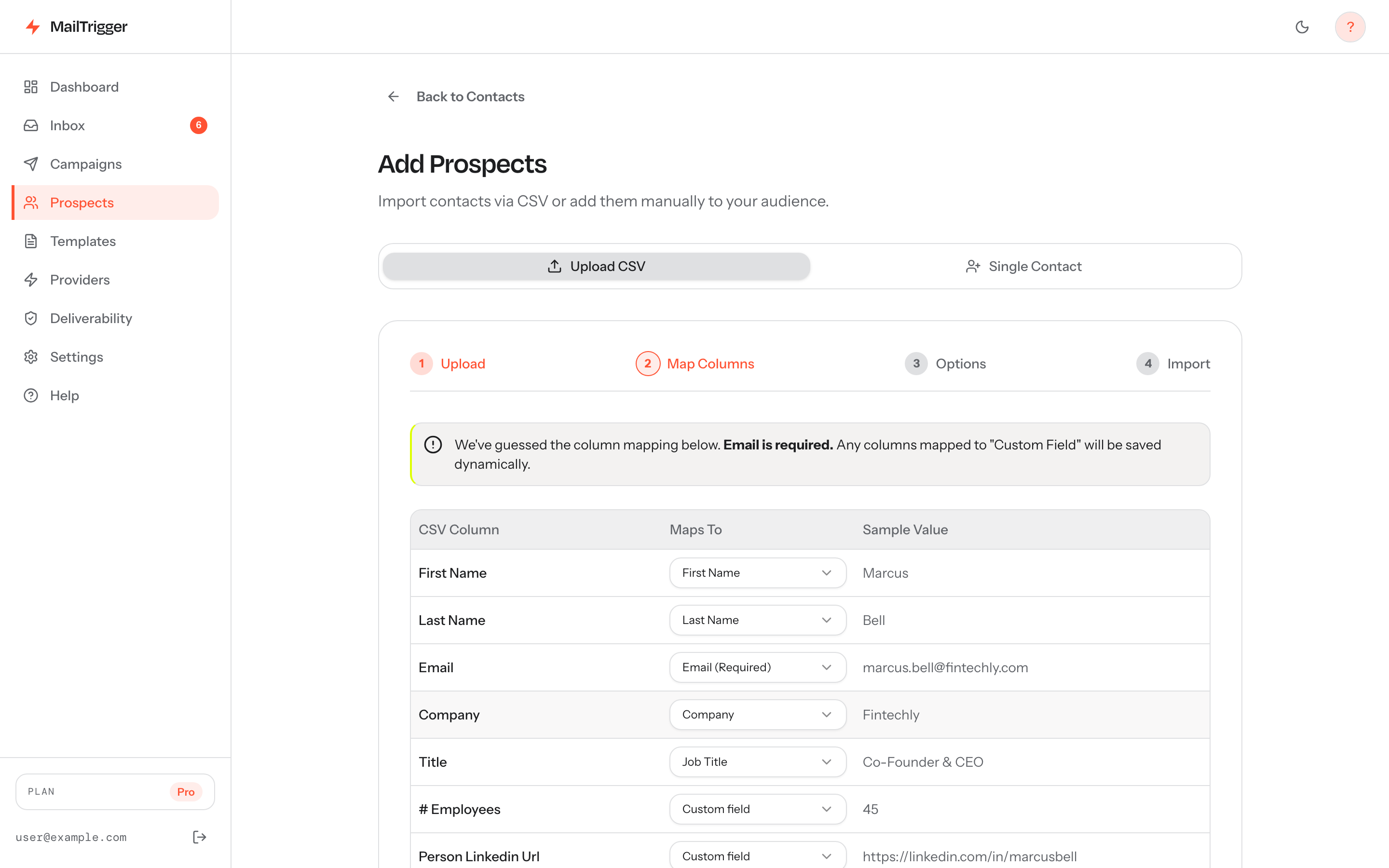
This is where the pairing pays off. MailTrigger's CSV importer is Apollo-aware: it recognizes Apollo's export column names and auto-maps them to the right fields, so first name, email, company, and title line up without manual fiddling. Extra columns (like LinkedIn URL) come in as custom fields you can use in templates.
MailTrigger's importer auto-detects Apollo's export columns and maps them for you; anything it doesn't recognize lands as a custom field you can drop into templates.
In practice:
- Go to Contacts → Import and drop in your Apollo CSV.
- The importer auto-detects the Apollo format and proposes a column mapping — review it and adjust any field it couldn't match.
- It de-duplicates against existing contacts on import, so re-running an export won't create doubles.
- Custom fields (e.g.
linkedin_url) become available as{{custom.linkedin_url}}in your templates.
Those custom fields are how you personalize beyond the first name — see how the template variable system handles fallbacks like {{first_name | there}}.
Step 3 — Verify and clean to dodge Apollo's bounce problem
This step is non-negotiable, and it's the one most people skip. Given the reported 15–35% bounce rates on raw Apollo data, never mail an export straight from download. Before you send:
- Run the list through an email verification service to drop invalid and risky addresses.
- Remove role accounts (info@, sales@, support@) unless they're genuinely your target.
- Suppress anyone already in your CRM or prior campaigns, and honor existing opt-outs.
- Spot-check a sample for obviously stale data.
A clean list protects your sender reputation, which is the asset everything else depends on. High bounces are a fast track to spam folders.
Step 4 — Send from your OWN inbox (BYOK) with warm-up + auth
Now the delivery layer. Instead of blasting from Apollo or a shared pool, you send through your own connected provider — Brevo, Resend, SendGrid, SES, Mailgun, or plain SMTP — so mail goes out under your own reputation on established ESP infrastructure.
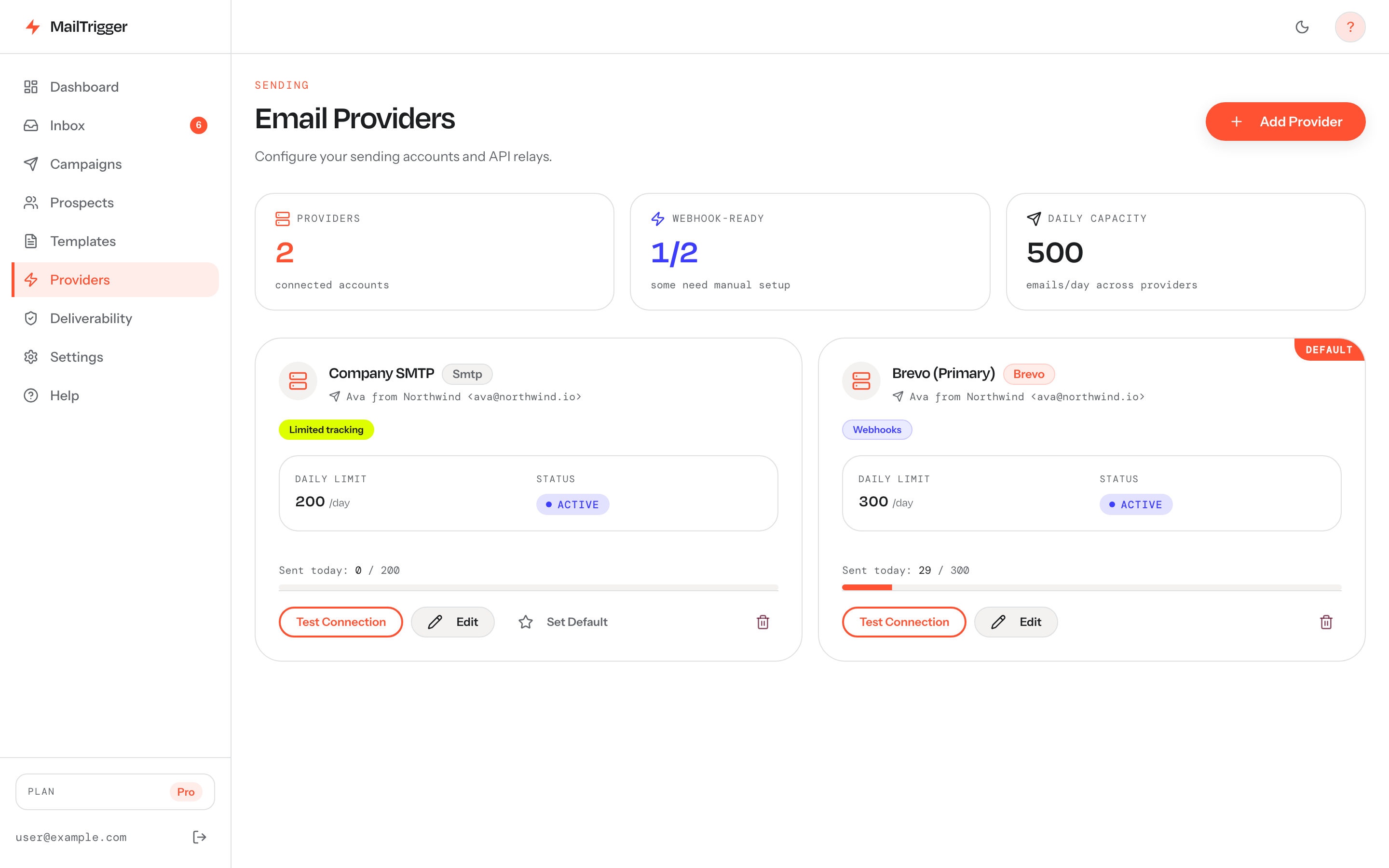 Apollo supplies the data; you supply the inbox. BYOK means your Apollo leads go out under your own authenticated sender, not a shared pool.
Before the first send:
- Authenticate the sending domain. SPF, DKIM, and DMARC are required by Gmail and Yahoo for bulk senders. Follow our step-by-step SPF, DKIM and DMARC guide.
- Warm up new domains/inboxes and respect daily caps — ramp gradually rather than firing your whole Apollo list on day one. See how many cold emails you can safely send per day.
- Send through BYOK, never a shared pool, so a stranger's spam can't tank your placement. Here's why in shared IP vs dedicated IP for cold email.
Build your sequence (initial + paced follow-ups), and MailTrigger sends on a randomized, human-paced schedule. The deliverability fundamentals are covered end-to-end in the cold email deliverability playbook.
Step 5 — Manage the replies
Once mail lands, replies start coming in. MailTrigger detects replies and surfaces them so you can triage fast — sort the interested from the not-now and the out-of-office, and follow up where it counts.
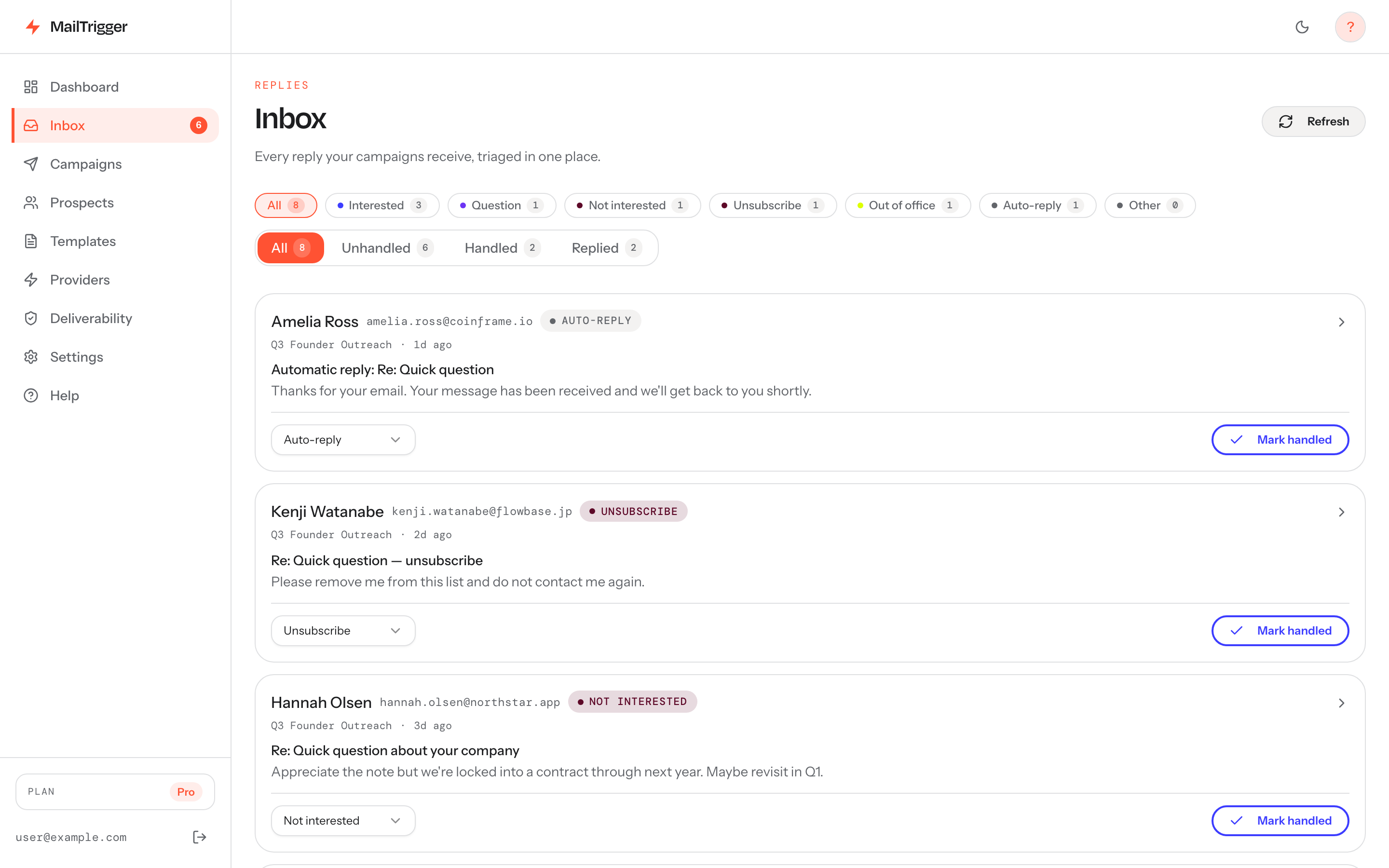 Replies from your Apollo-sourced campaign land here for triage — the downstream signal that tells you whether the list and copy are working.
Reply rate is the metric that matters most. For what "good" looks like and how to lift it, see the cold email reply-rate benchmarks. And if you want to scale Apollo-sourced sending without paying per email, the free-tier stacking guide shows how to send 1,000+/day at $0 via BYOK.
FAQ
Is Apollo good for cold email?
Apollo is excellent for building your cold email list — it's one of the largest B2B databases, with strong search and enrichment (apollo.io). It's weaker as the actual sender: it's a data tool first, and raw exports bounce heavily. The best setup uses Apollo for data and a dedicated BYOK sender for delivery.
How accurate is Apollo data?
Apollo's data is broad but, like any large database, it drifts. Reviewers commonly report bounce rates of 15–35% on unverified exports (g2.com). That's why you should always run an Apollo export through email verification and cleaning before sending — never mail it straight from download.
Can I export Apollo contacts?
Yes. Run your Apollo search, select contacts, and export to CSV. Exports are gated by plan and credits — Apollo has a free tier plus paid plans from around $49/user (verify current pricing) (apollo.io). MailTrigger's importer auto-detects the Apollo CSV format and maps the columns for you.
Does Apollo send cold email well?
Sending from Apollo directly tends to underperform a dedicated sender, because cold email needs warmed inboxes, paced delivery, careful SPF/DKIM/DMARC authentication, and full reputation control. Pair Apollo's data with a BYOK tool like MailTrigger so your mail sends from your own authenticated inbox under your own reputation.